

First, Add a Production Partner
Etsy requires every print-on-demand seller to declare who physically makes their items. Without one, Etsy refuses to create the listing, and the error it returns isOh dear, you cannot sell this item on Etsy, which sounds like your shop is banned. It is not. It only means the production partner is missing.
Etsy’s API has no way to add a production partner, so this is something you do once, by hand, in your Etsy account.
1
Open the production partner settings
In Etsy Shop Manager, go to Settings then Partners you work with, and click to add a partner.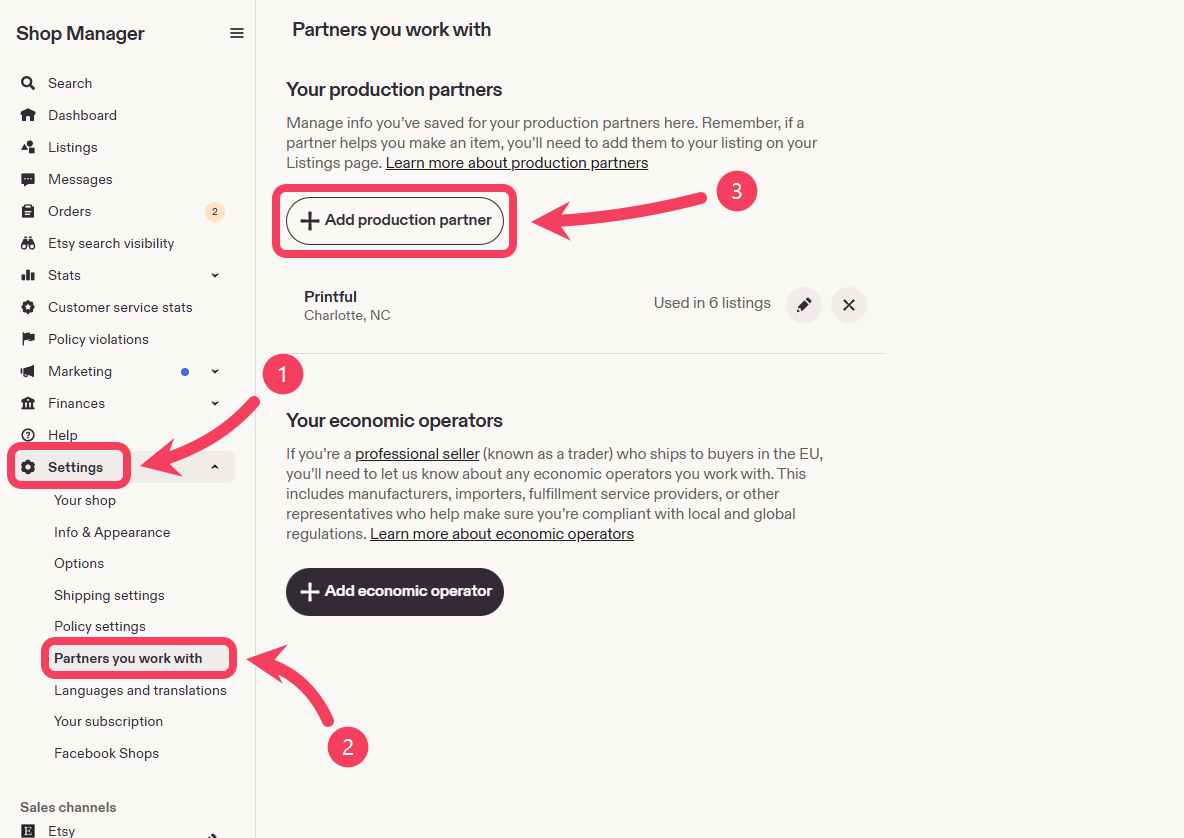
2
Name the company that prints your items
Enter the company that actually prints and ships your products. If you fulfill through Printful, that is Printful. If you fulfill through Printify, that is Printify. Set Location to where that company produces your items.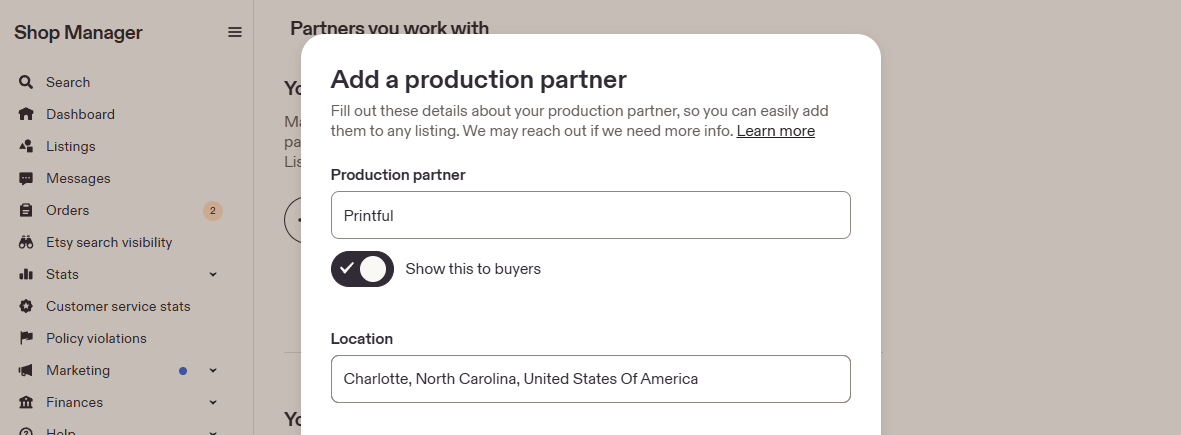
3
Describe what they do for you
This description is shown to buyers, so keep it clear and honest. Say that they print your designs and ship the orders. Something like: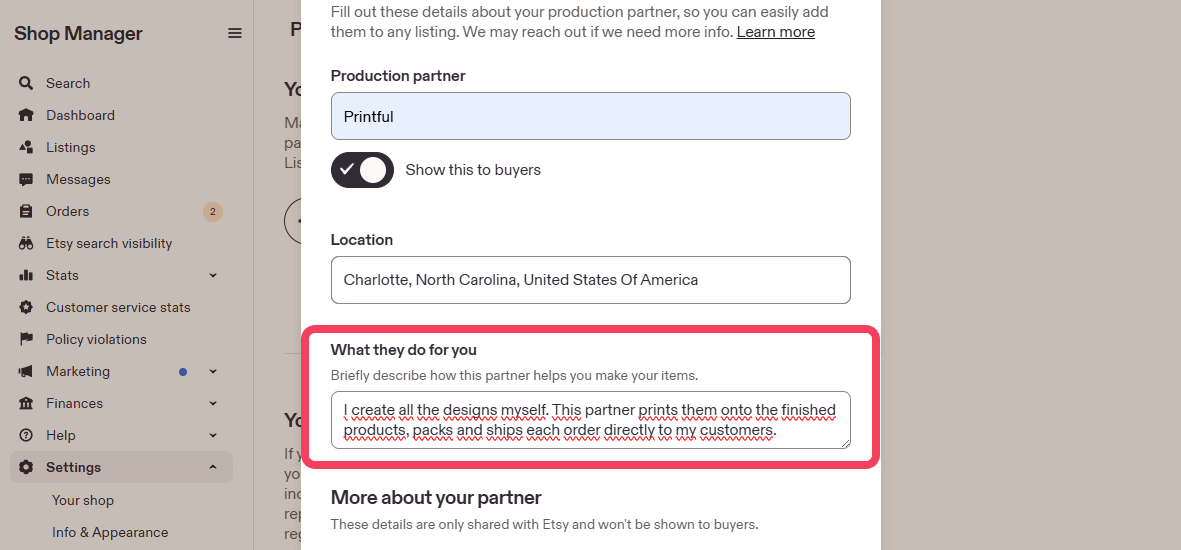
I create all the designs myself. This partner prints them onto the finished products, packs and ships each order directly to my customers.Avoid vague lines like “they help with my shop”. Etsy wants buyers to understand the arrangement.
4
Answer the three questions about the partnership
More about your partner has three dropdowns. Etsy keeps these answers internal, so buyers never see them.Why do you work with this partner? Most print-on-demand sellers pick I don’t have the technical ability or equipment to make it entirely by myself, which is the honest answer if you do not own a printer.What is your role in the design process? Pick I design everything myself if the artwork is yours.What is your partner’s role in the production process? Pick They do everything for me. Printful and Printify print your design, pack the order, and ship it straight to your buyer. The item never passes through your hands, so the other options do not apply: you are not assembling components, altering a finished product, or adding your own packaging.That answer does not take credit away from you. The design question above already records that the artwork is yours. Together the two answers say what is actually true, which is that you design everything and your partner produces everything.Save when you are done.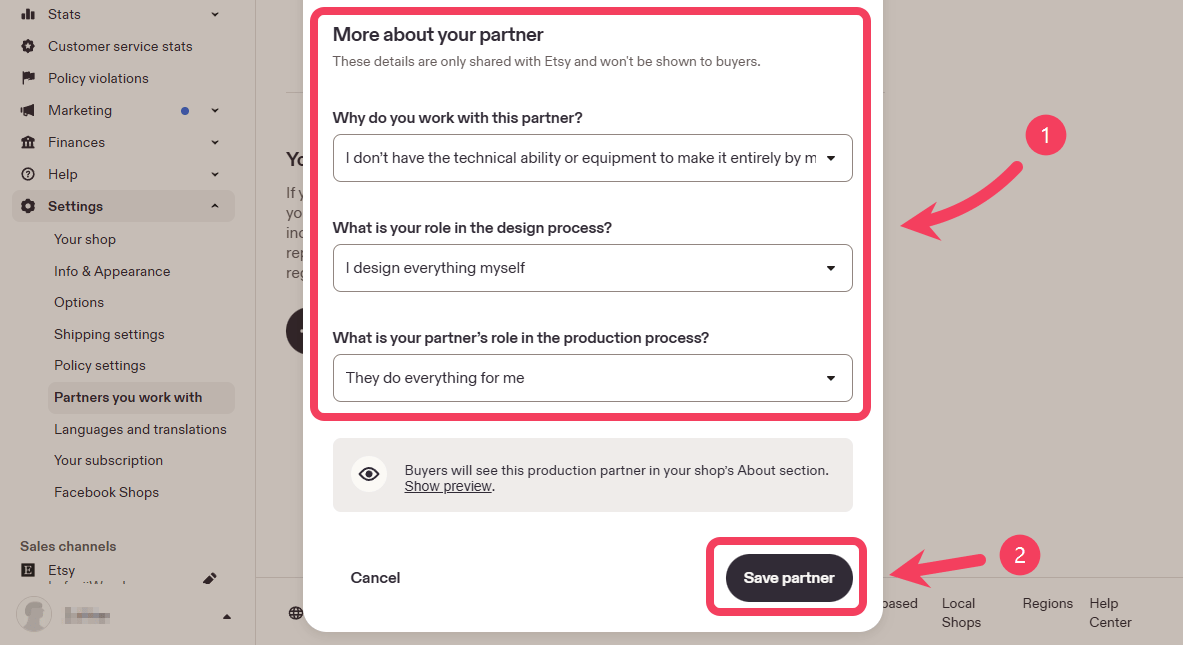
Fill In the Etsy Settings
Back in Mockspark, open your product. Building a product runs in three steps, shown along the bottom of the page.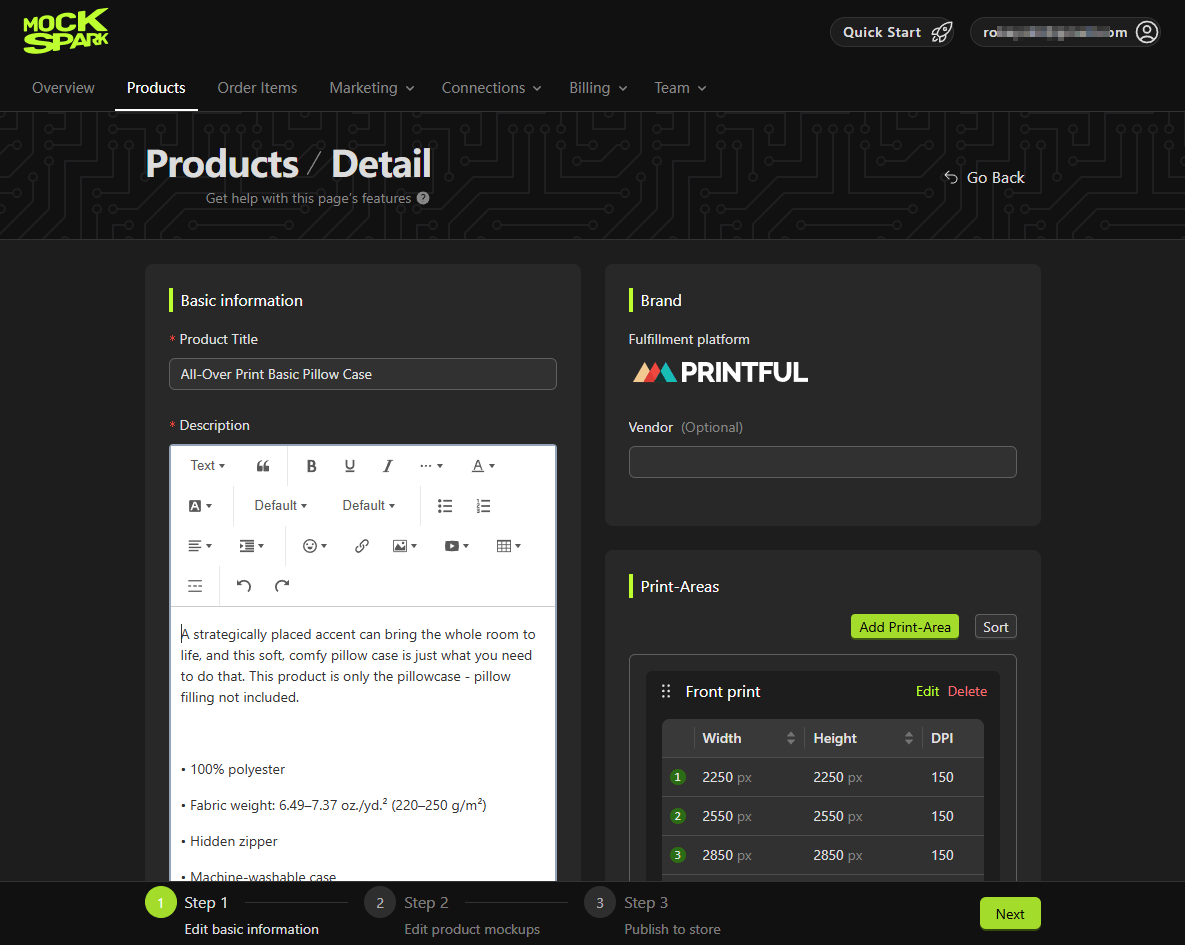
Shop and Platforms
Store is the Etsy shop this product will be published to. You can switch shops while the product is still a draft. Once it has been published, the shop is locked. Sales platform and Fulfillment platform are shown for reference. They come from how the product was created.Production Partner
Pick the partner you added earlier. This field is required, because Etsy rejects the listing without it. If the dropdown is empty, the partner has not saved on Etsy’s side yet. Add it, then reload this page.Store Currency and Weight Unit
Store currency should match the currency your Etsy shop sells in. Prices you set on the variants are read in this currency, so getting it wrong produces prices that are off by a lot. Weight unit only matters if your print provider needs shipping weights. Leave it as No weight if you are not sure.Etsy Category
Mockspark preselects a category based on the product type, so most of the time you can leave it alone. Change it if the guess is off, since the category affects where buyers find your listing on Etsy.Etsy Shipping Profile
Etsy handles shipping costs through shipping profiles that live in your shop. If you already have profiles, the dropdown lists them. Pick the one you want and Mockspark attaches it to the listing. If your shop has none yet, the dropdown holds a single extra option instead: Mockspark Shipping (free shipping). Choosing it tells Mockspark to create that profile in your Etsy shop as part of publishing. It is a real profile, so it shows up in your Etsy shipping settings afterwards and you can edit it there like any other. The profile is created with your shop’s own ship-from country, taken from your Etsy settings. If that country uses postal codes, Etsy requires one and does not share it through the API, so a postal code box appears under the dropdown and Mockspark asks you to fill it in once.Etsy Return Policy
Optional. Pick one of your shop’s return policies if you have them. Mockspark does not create return policies for you, because a return policy is a promise you make to buyers and that should be your wording, not ours. You can add one in your Etsy shop policy settings and reload the page.Processing Time
You will notice there is no field for this. Mockspark sets processing time to 2 to 5 days on every listing it publishes, which reflects how long print-on-demand production actually takes. If your shop already has a matching profile, Mockspark reuses it rather than creating another one.Buyer Personalization
Leave this off to sell a fixed design. Turn it on to let buyers make their own version before they buy. Let Buyers Personalize Your Listings covers how that works from both sides.Variants
Set the price and availability for each variant. Prices are in the store currency you chose above.Publish
Click Done & Publish. Mockspark creates the listing on Etsy, uploads your photos, sets up the variants, and activates it. When it finishes you get the listing URL and a Check on Etsy link that opens the live listing, so you can see what buyers see.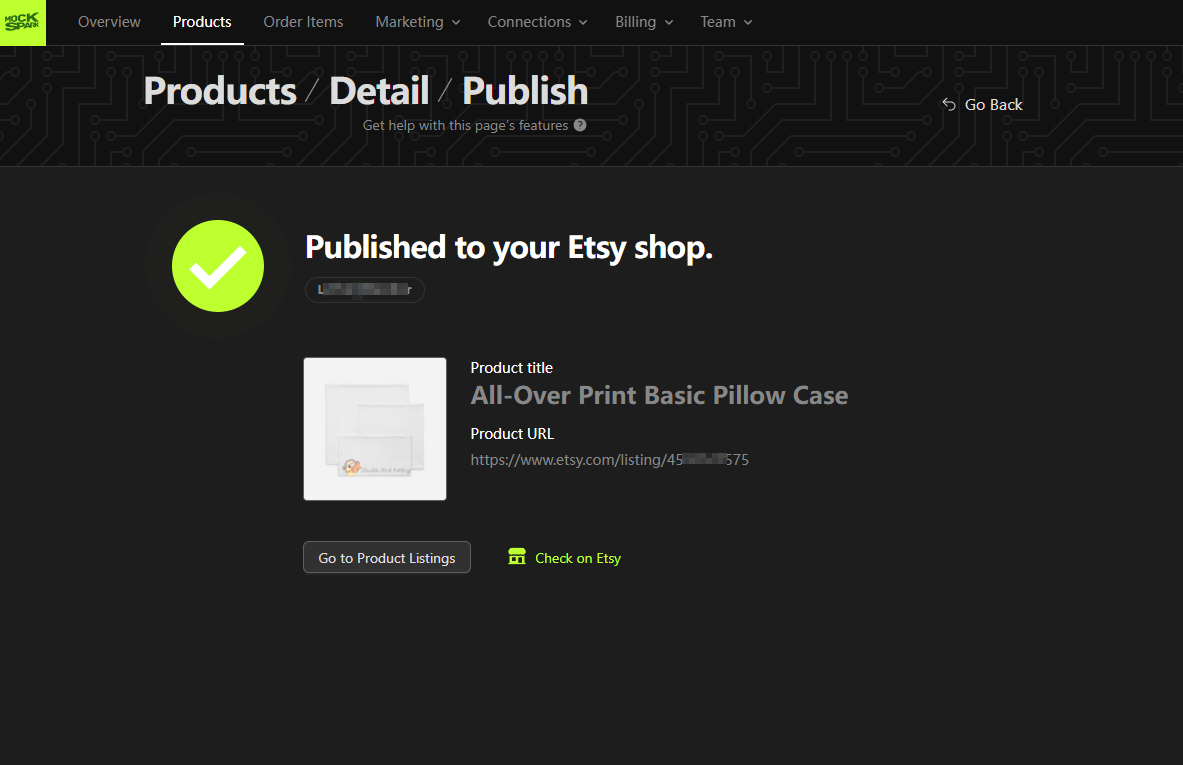
Updating a Published Product
Change the design, prices, or photos in Mockspark and publish again. Mockspark updates the existing listing instead of creating a second one. If you deleted the listing on Etsy in the meantime, Mockspark notices and creates a fresh one.When Publishing Fails
Oh dear, you cannot sell this item on Etsy
Oh dear, you cannot sell this item on Etsy
This is Etsy’s message for a missing production partner. It is not about your shop’s selling privileges. Add a production partner as described at the top of this page.
Production partner is required
Production partner is required
Mockspark caught the same problem before sending it to Etsy. Same fix.
Shipping profile is required
Shipping profile is required
Pick a profile, or choose Mockspark Shipping (free shipping) to have one created.
The category dropdown is empty
The category dropdown is empty
Etsy’s category list failed to load. Reload the page. If it keeps happening, your shop connection may need reauthorizing. Check the connections page for a Reconnect required tag.
Next
Etsy Orders and Fulfillment
What happens after a buyer places an order.
The term ‘Etsy’ is a trademark of Etsy, Inc. This application uses the Etsy API but is not endorsed or certified by Etsy, Inc.